Looking for the overview? This is the deep walkthrough with every Recent Follow screen. If you want the higher-level explanation of why the official Instagram app fails at this, plus a quick comparison with other tools, start with How to See Who Someone Recently Followed on Instagram.
Want to know who a particular Instagram account recently followed? The official Instagram app doesn't sort the following list by time — it's rearranged by mutual friends, engagement frequency, and interaction signals, so newly followed accounts often get buried mid-list even if you scroll through hundreds of entries.
Whether you caught your partner following someone new, want to know what your favorite creator just followed, or just need to keep tabs on a friend's connections, Recent Follow by IGExport re-sorts any public Instagram account's following list chronologically — the newest follows always appear on top.
Quick answer: Instagram doesn't sort the following list by time, so the only reliable way to see someone's most recent follows is a tool that re-sorts the list chronologically. The fastest way with Recent Follow:
- Download Recent Follow (free, iOS or Android) — no login needed for public accounts.
- Type the Instagram username and tap Sort Following by Date.
- Open the Following tab — it's re-sorted newest-first, so the latest follow is on top.
- Check back later for
+1 Followingbadges and real-time push alerts the moment they follow someone new.
Looking up a public account is anonymous — they're never notified.
Prefer to watch? Here's the whole thing in under a minute — searching a username, reading the newest-first list, and turning on alerts:
What is Recent Follow? An app that sorts Instagram's following list by time
Recent Follow is an app by IGExport that lets you view any public Instagram account's follows and followers sorted chronologically — the most recently followed accounts always appear first.
Unlike scheduled-report tools like Snoopreport or Dolphin Radar, Recent Follow shows results instantly — no subscription lock-in, no waiting for weekly reports, and no login required to look up public accounts. The walkthrough below shows you how to use it.
How to See Who Someone Recently Followed on Instagram?
Enter someone's Instagram username and Recent Follow will sort their followers or following from newest to oldest. Here are the four steps end-to-end.
Step 1: Download Recent Follow

Step 2: Search for any public Instagram username — no login required
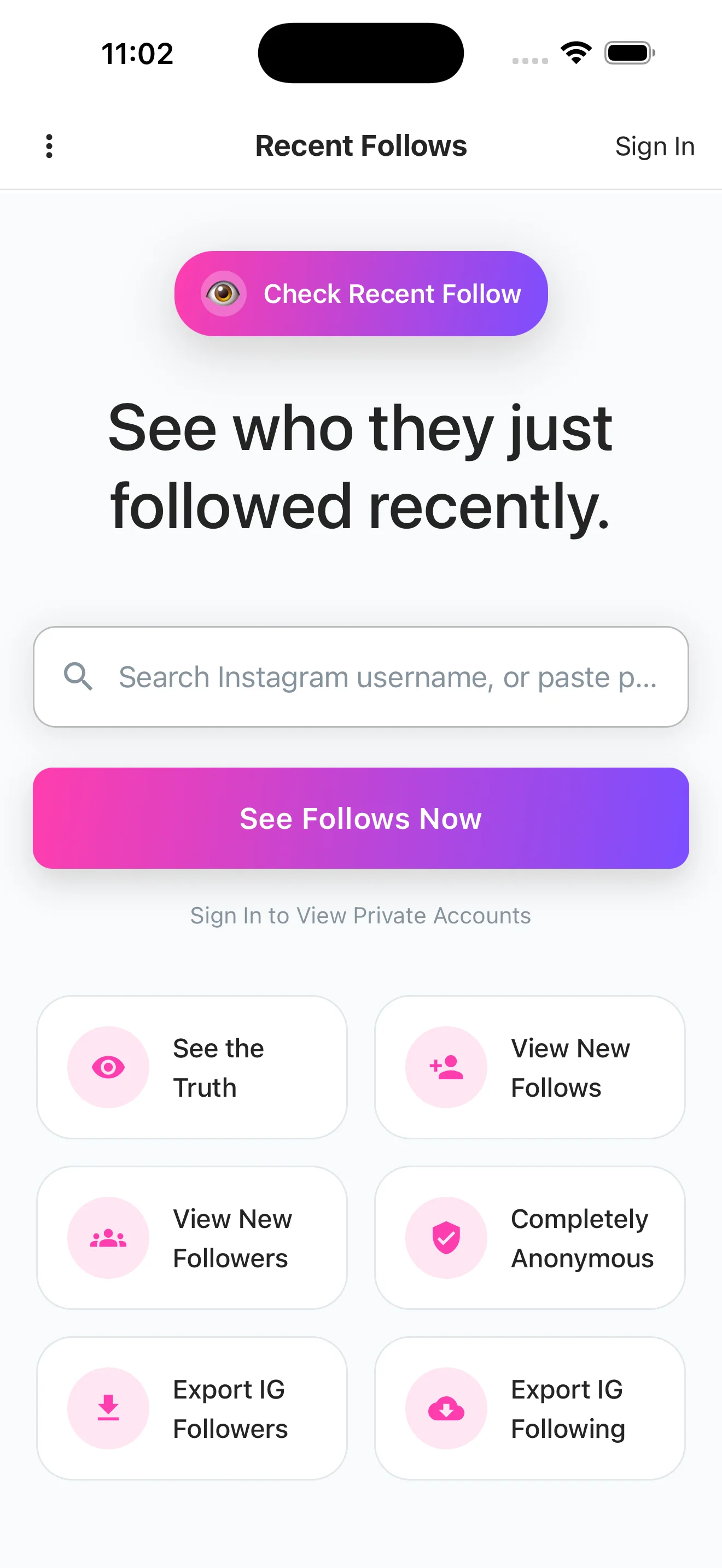
Open the app and you'll land on the home screen. Just type the Instagram username you want to check into the search bar and tap Sort Following by Date.
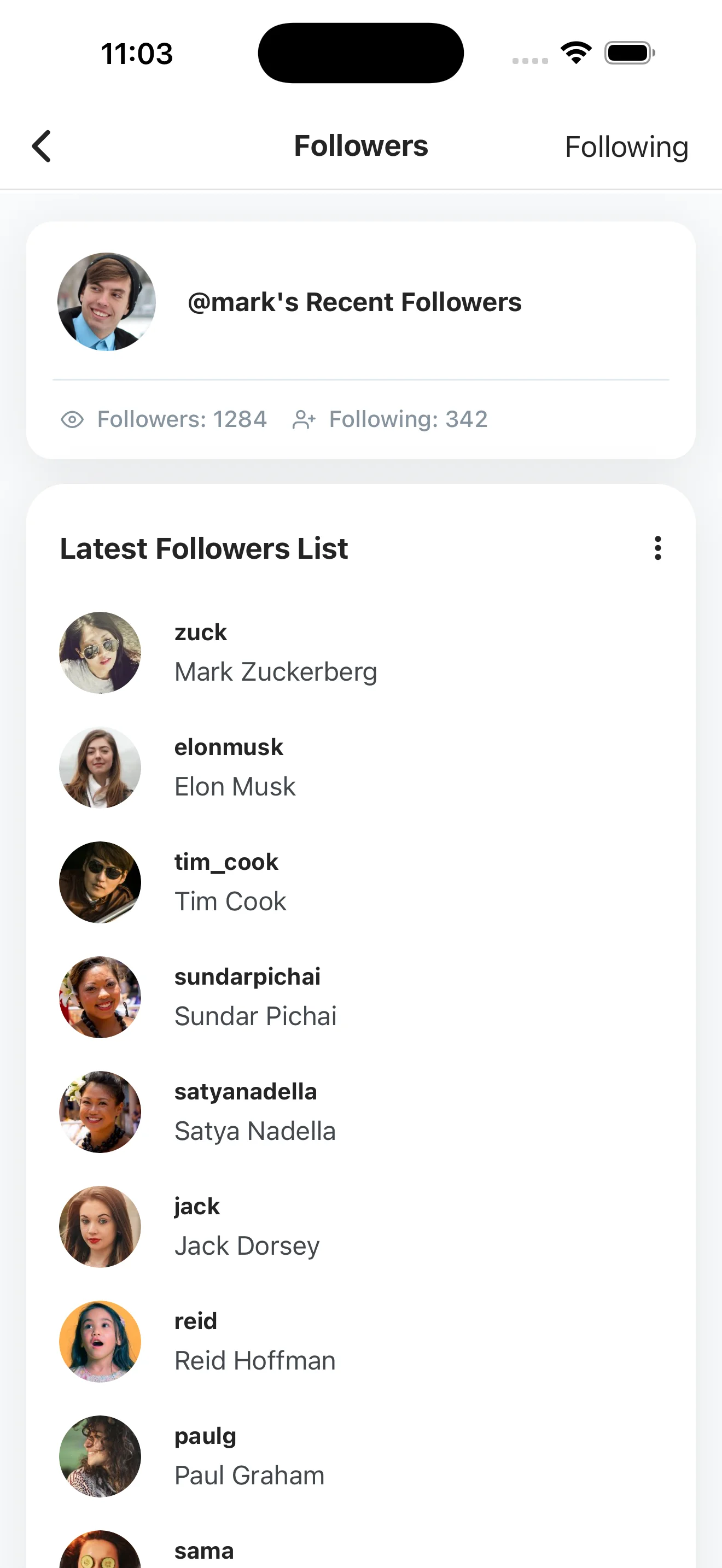
Step 3: View their recent follows and followers, sorted by time
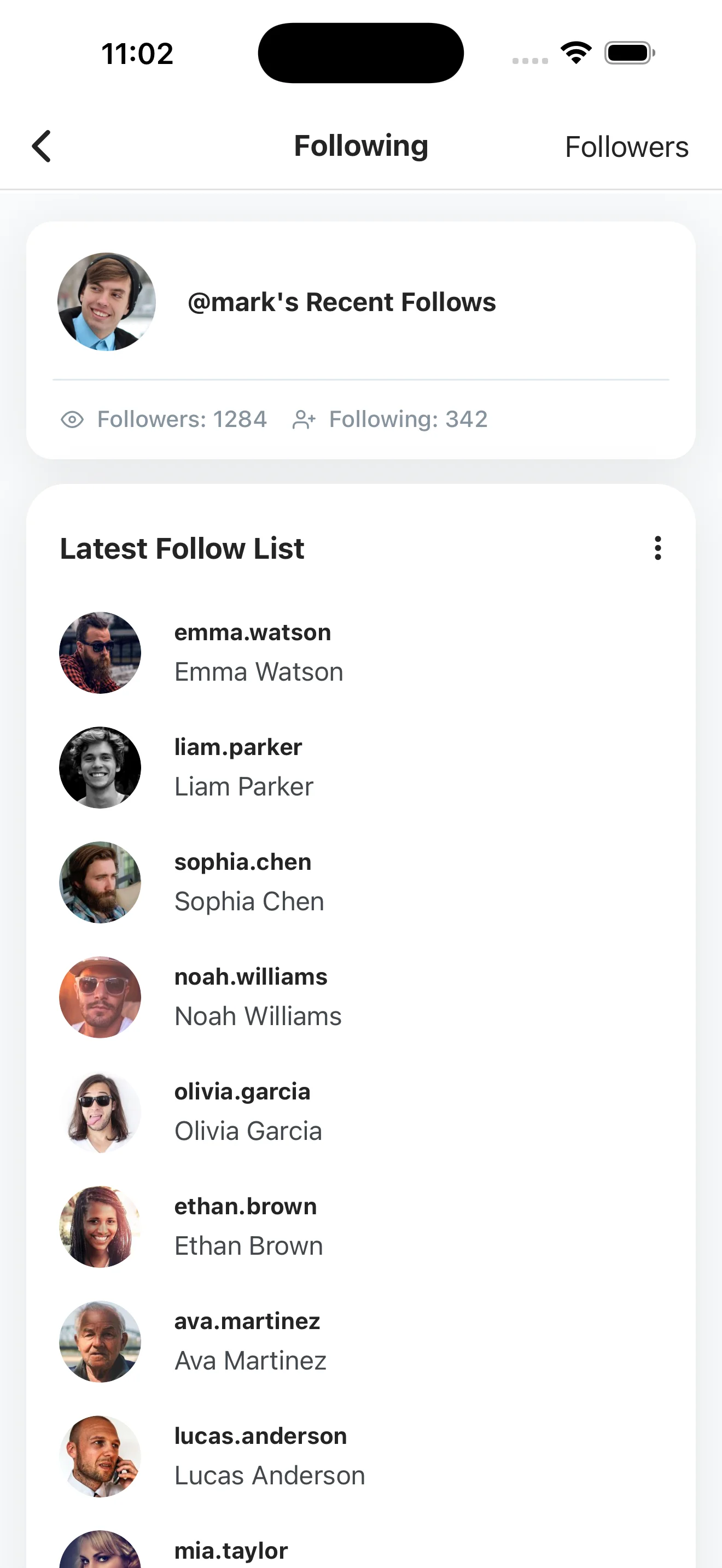
You'll see two tabs — Following and Followers — both sorted from newest to oldest, so the most recent activity is always on top.
Step 4: Come back later to see what's new
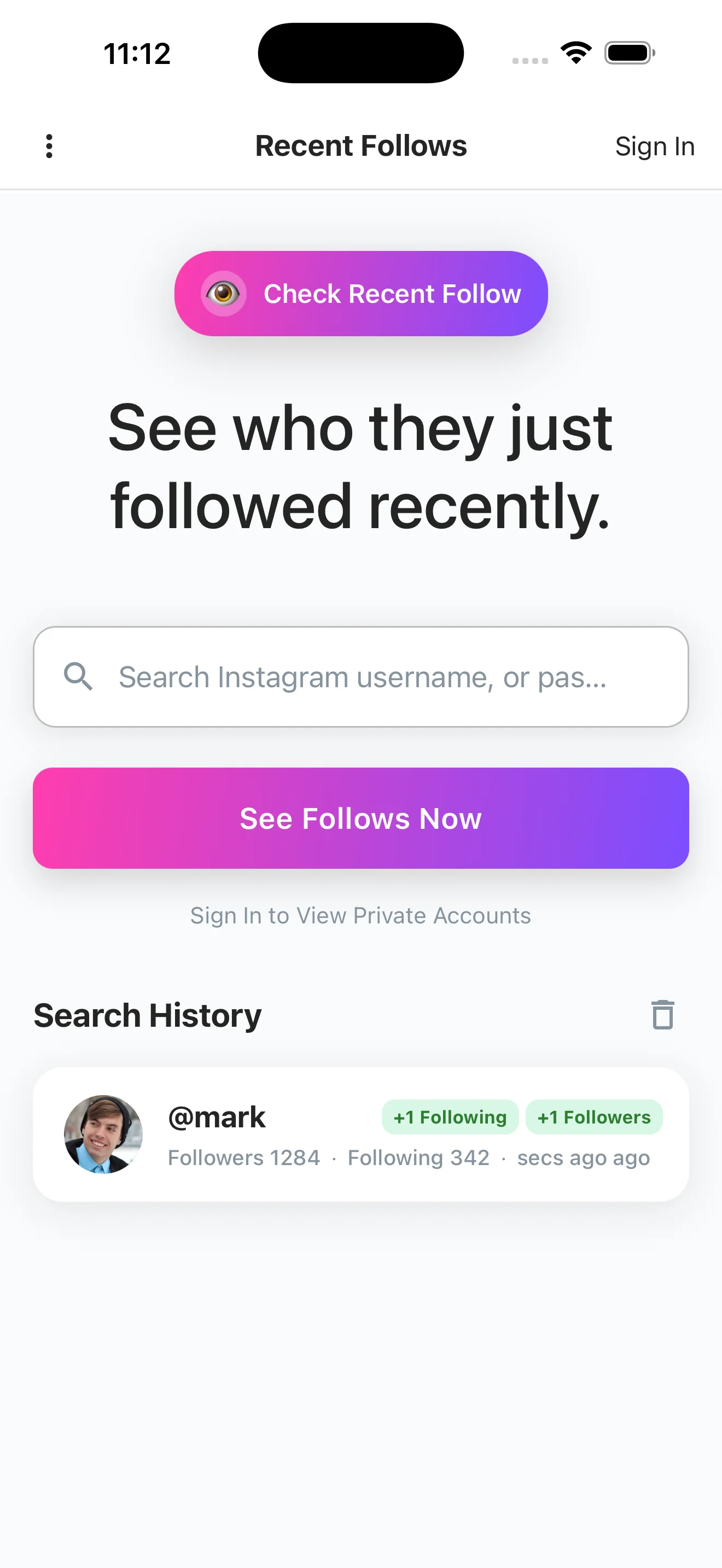
When you search the same account again, it shows up in your Search History with green badges like +1 Following or +1 Followers, telling you at a glance how many new activities happened since your last check.
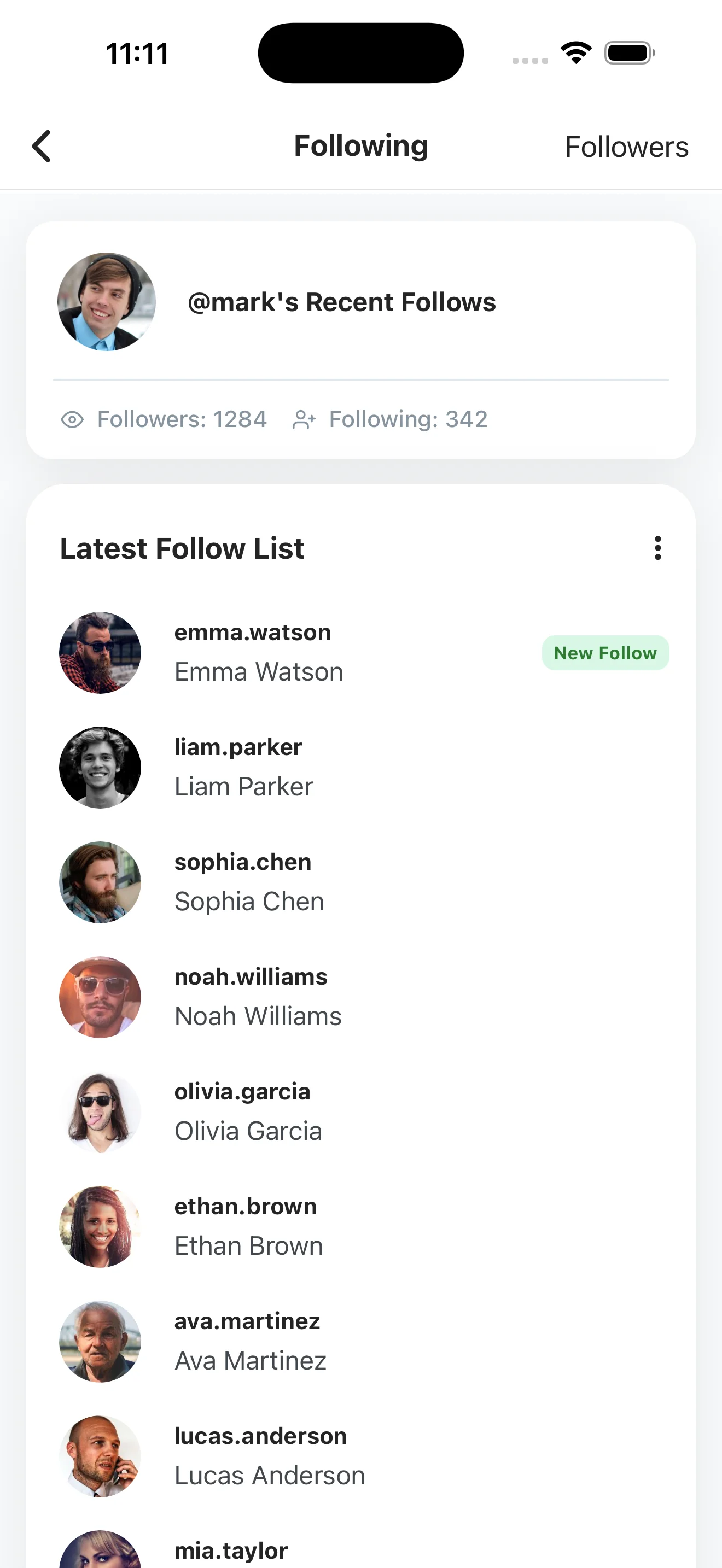
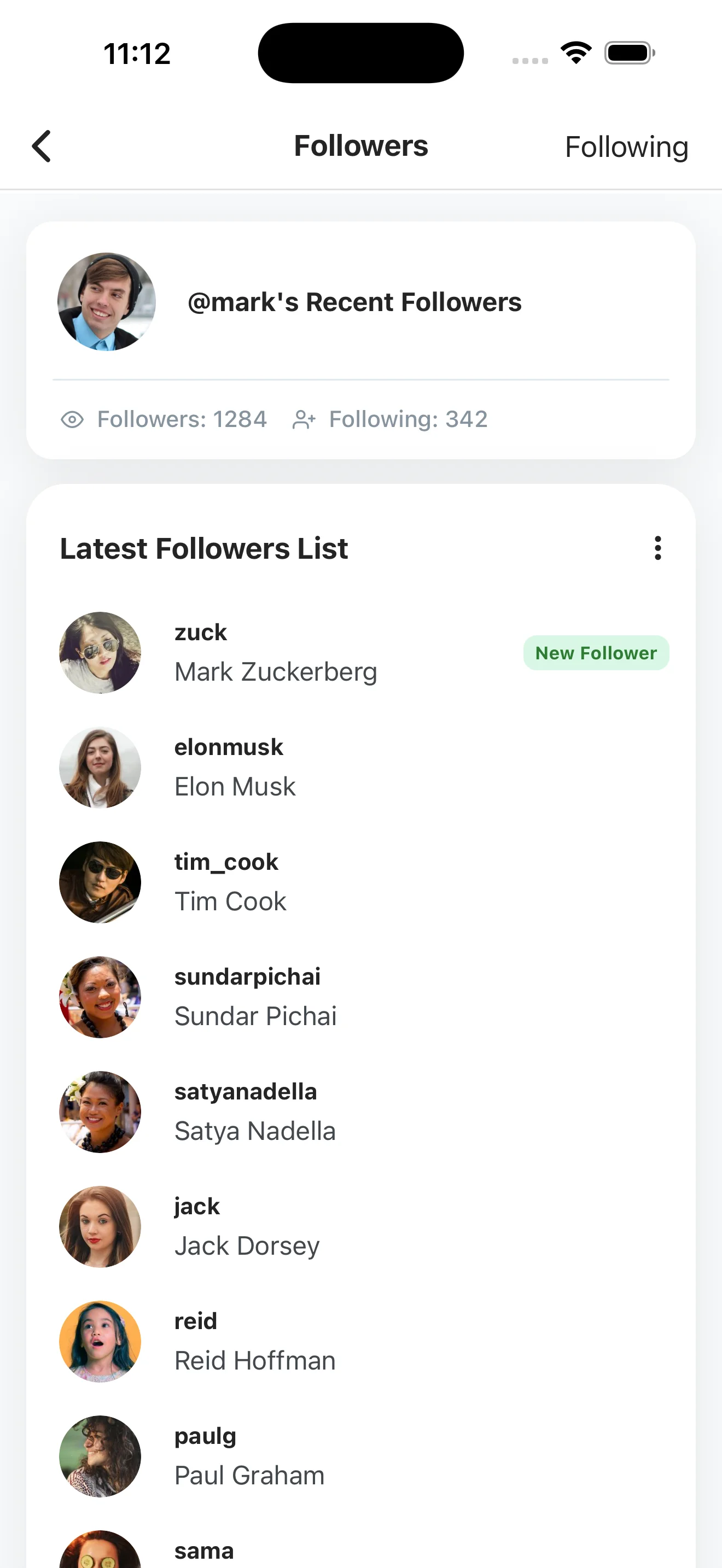
Tap in and the newly followed accounts are marked with a green New Follow label, and new followers get a New Follower label — no more scrolling to figure out what changed.
Bonus: Get real-time push notifications the moment they follow someone new
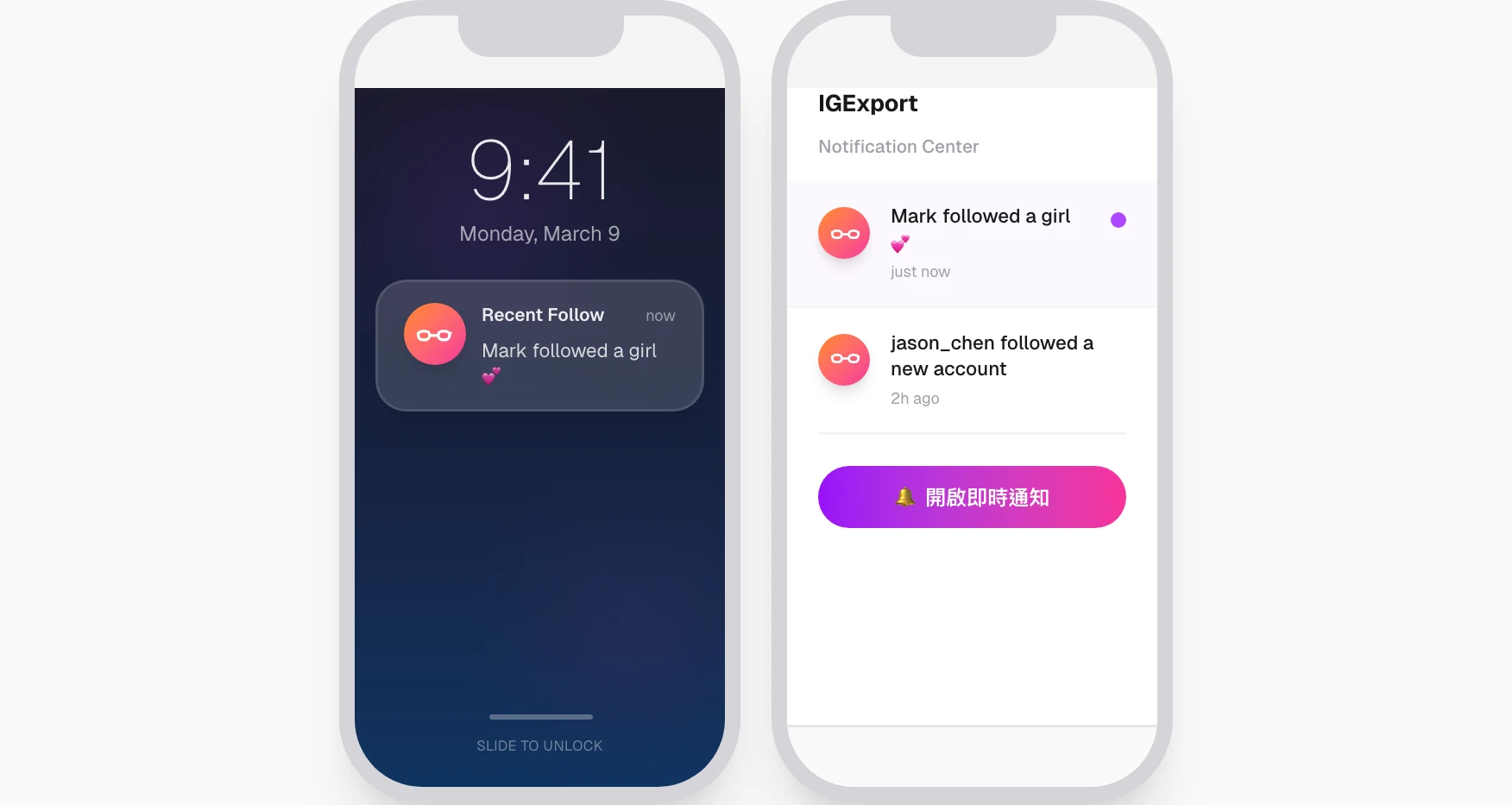
Don't want to re-open the app to check? Turn on push notifications and Recent Follow will alert you in real time the moment the account you're watching follows a new account or gains a new follower — the update lands on your lock screen, so you don't have to remember to come back and search again.
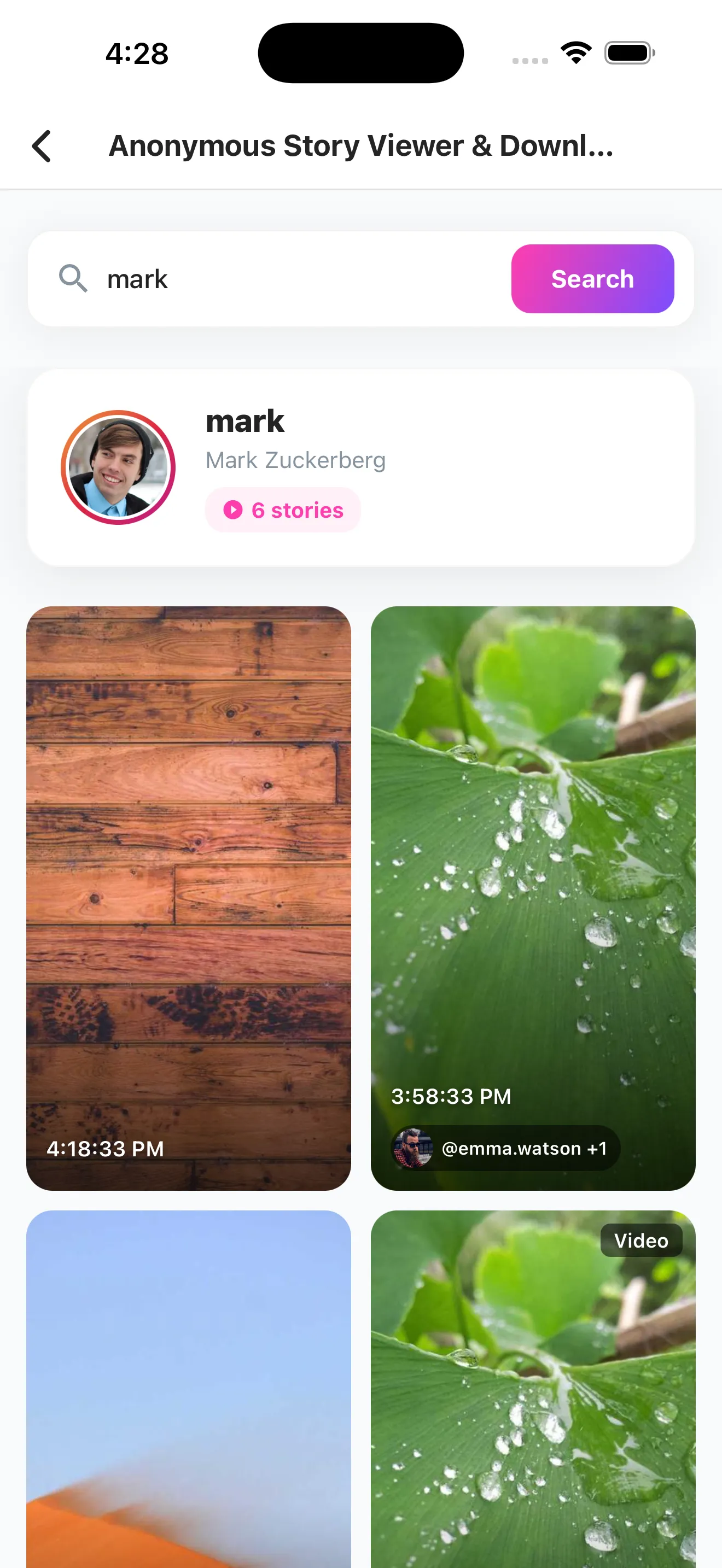
Bonus: Watch Instagram stories anonymously — and download them
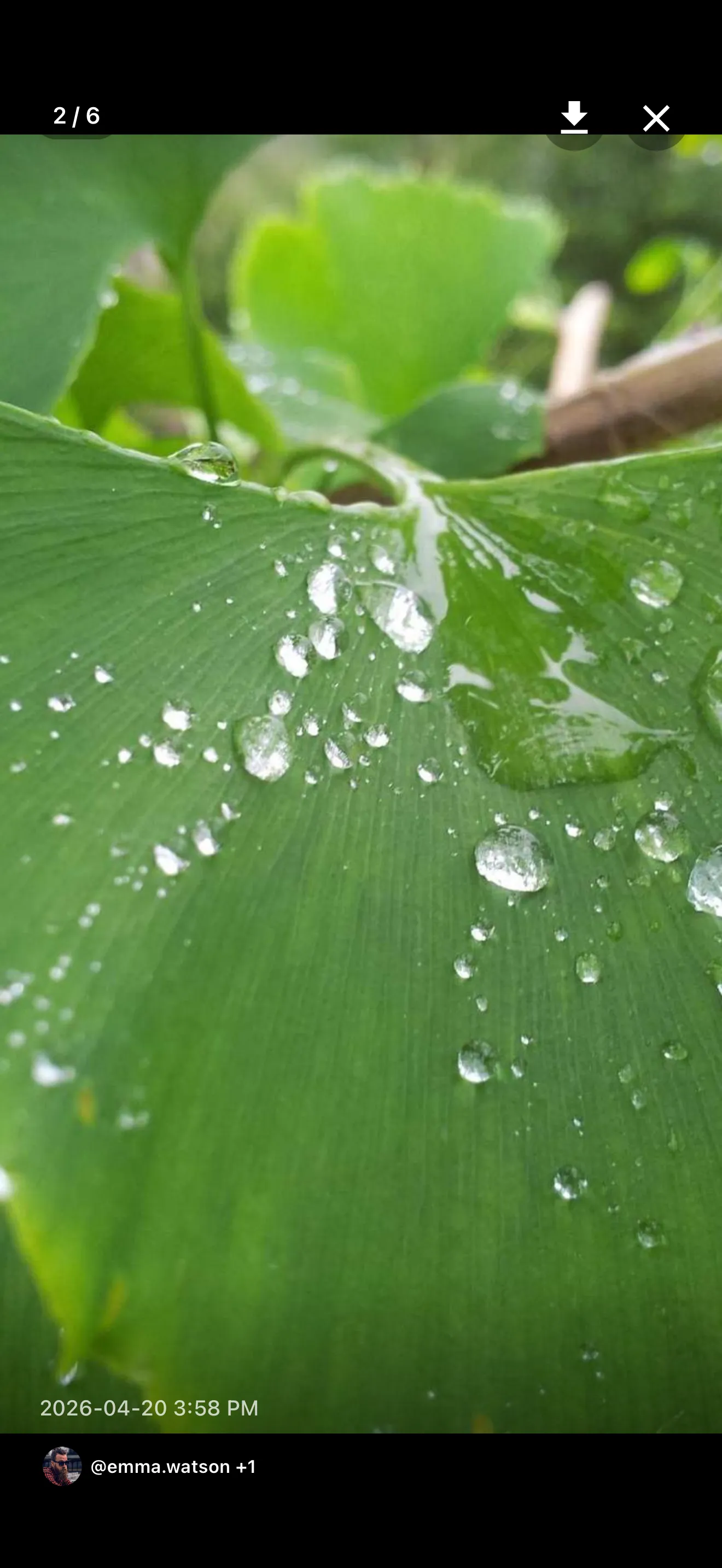
Beyond follow lists, Recent Follow also lets you anonymously view any public Instagram account's stories — your username never shows up in their viewer list. See something worth keeping? Tap the download button in the top-right corner to save the full-resolution photo or video straight to your camera roll. Prefer to stay in your browser? Our free Instagram Story viewer and downloader does the same thing — no app, no login.
Want to check private accounts? Sign in to unlock
Everything above works without logging in. If the account you want to monitor is private, sign in with your Instagram account inside the app and Recent Follow will use your existing access to fetch the data.
My test: scrolling Instagram for 2 minutes vs. 5 seconds in Recent Follow
Disclosure: I'm the developer of Recent Follow. What follows is my own observation from building and using the app. I tried to back it up with concrete numbers, but it's still a first-hand account from someone with a stake — read it with that in mind.
Before I built this app, I kept hitting the same wall — wanting to know what someone had just followed and not being able to find out. I tried it on a creator account that follows around 800 people: scrolling through the official Instagram app's following list top-to-bottom took me almost two minutes, and I still couldn't tell which entry was the newest. That's because Instagram's following list isn't ordered by time — it's reshuffled by mutual friends, engagement frequency, and other algorithmic signals.
Switching to Recent Follow, I pasted the same username into the search bar and went from opening the app to seeing the most recent follow on top in under five seconds. In my experience, the top 3–5 entries are almost always accounts followed within the past week or so.
Three days later, I came back. The account was already at the top of my search history with a green +1 Following badge. Tapping in, the newly followed account had a green New Follow label right next to it — no memory tricks, no manual diffing. Exactly who they followed in those three days was right there on the screen.
Data source and privacy
"Checking someone's follow activity" is a sensitive topic. Here's exactly how Recent Follow handles it:
- Data comes only from public Instagram content. When you search without logging in, Recent Follow only pulls the same data anyone could see by visiting that public profile in a browser.
- The person you look up is never notified. Looking up a public account is anonymous — there's no notification, no visitor log, no way for them to see who searched them.
- Private accounts require your own access. To check a private account, you sign in with your own Instagram account, and Recent Follow only uses data you already have permission to see. If you can't see their profile on Instagram, the app can't either.
- Your search history stays on your device. It's used locally to show
+1 Followingbadges for new activity — Recent Follow doesn't sell it or publish it.
How to see recently followed on a private Instagram account
Recent Follow doesn't bypass Instagram's privacy settings — but it works with private accounts you already have access to. Sign in with your own Instagram account inside the app, and Recent Follow will use your existing permissions to pull that private account's following list and sort it chronologically, exactly the same way it works for public accounts.
If the private account hasn't accepted your follow request, neither Recent Follow nor any other tool can show you what they've recently followed — that's a real Instagram privacy boundary, not a software limitation. Anything claiming otherwise is either lying or scraping data they shouldn't have.
For the complete breakdown — what you can see with and without approval, the legitimate workarounds, and how the "private account viewer" scams work — see the dedicated guide: How to See Recently Followed on a Private Instagram Account.
Frequently asked questions
Will they know I looked them up?
No. Looking up a public account doesn't notify them, and Instagram doesn't show a visitor log.
Can I check private accounts?
Only if you already have permission to see them. Recent Follow doesn't bypass privacy settings — it just re-sorts the following list you can already access.
Why can't the official Instagram app sort by time?
Instagram's official app uses an engagement-based algorithm (mutual friends, interaction frequency, etc.) to order the following list, so a newly followed account might be buried mid-list. Recent Follow pulls the raw data and sorts it chronologically so "who did they follow most recently" is always on top.
What's the order of someone's following list on Instagram?
Instagram's following list is not chronological. It's ranked by an engagement algorithm — mutual friends, how often you interact, and other signals — so accounts you engage with surface near the top and a brand-new follow can land anywhere mid-list. That's exactly why you can't read "who they followed most recently" off the native list, and why Recent Follow re-sorts it by time.
How do I see someone's Instagram following in chronological order?
The native app can't do it. Recent Follow pulls the raw following list for any public account and re-sorts it from newest to oldest, so the most recent follow is always first — enter the username, open the Following tab, and the chronological order is right there.
How can I see who my boyfriend recently followed on Instagram?
If his account is public, enter his username in Recent Follow and open the Following tab — his newest follows appear on top, so you can see exactly who he added most recently. You don't need his password and he's never notified. If his account is private, you'd need to already be an approved follower and sign in with your own Instagram account; no tool can bypass a private account you don't have access to. For all three methods compared (including Instagram's built-in shared-activity screen), see the dedicated guide: How to See Who My Boyfriend Recently Followed on Instagram.
How can I see someone's recent followers for free?
Looking up any public account in Recent Follow is free — download the app, type the username, and view both their recent Following and Followers tabs without paying or logging in. Recent Follow is freemium: public lookups are free, and an in-app purchase unlocks extras on larger lists. For a private account you must be an approved follower and sign in with your own account.
Is it free? Do I need to log in?
Looking up public accounts is free and doesn't require a login — just type the username and tap search. You only need to sign in with your own Instagram account if you want to check a private profile.
How is it different from Snoopreport or Dolphin Radar?
Recent Follow has no paid plan lock-in and no scheduled report delays — search and see results instantly. For a deeper comparison, see Dolphin Radar Alternatives in 2026.
Start tracking who someone recently followed on Instagram
If you find yourself regularly wanting to know what an Instagram account is following or who's been following them, just download Recent Follow and search the username — no signup, no payment. The next time you check the same account, the app automatically calls out the new activity since your last visit, so you don't have to compare lists by hand.
Related reading
- How to See Who Someone Recently Followed on Instagram (Step-by-Step) — the overview / pillar guide
- How to See Who My Boyfriend Recently Followed on Instagram
- How to See Recently Followed on a Private Instagram Account
- Best Apps to See Recent Instagram Follows (2026 comparison)
- Dolphin Radar Alternatives in 2026
- Recently Followed on Instagram: What It Means
- Can You See What Someone Recently Followed on Instagram?
- Instagram Recent Following: Why the List Isn't Sorted by Time
- Recent Follows IG: 30-second guide
- Anonymous Instagram Story Viewer & Downloader — view and save Stories without logging in