Want the overview? This post is a deep, screen-by-screen tutorial of the LINE Block Checker app. If you want the bigger picture — every detection method that exists, what each one proves, and how to choose — start with How to Tell If Someone Blocked You on LINE: 6 Ways That Still Work in 2026.
Want to compare different apps and methods? See LINE Block Checker Apps Compared: 4 Methods Real-Tested — side-by-side scoring of every detection option on accuracy, speed, cost, and footprint.
Suspect a friend has blocked you on LINE but can't confirm it? LINE deliberately hides block status from the person being blocked — your messages still show as "unread" (no error), their avatar stays put, and sending a message never bounces. The old tricks — sending a sticker, creating a fake group — technically work but break down once your contact list grows past a dozen people.
LINE Block Checker is a mobile app that signs into your LINE account once, scans your entire friend list, and lists every contact who has blocked you. No sticker-testing, no fake groups. Below is the full walkthrough.
What is LINE Block Checker? Find who blocked you on LINE in one tap
LINE Block Checker is a mobile app purpose-built for LINE block detection. Sign in with your LINE account and it compares the full status of your friend list, producing a private list of contacts whose behavior matches "has blocked you."
It's not a bypass tool — it won't help you send messages to someone who blocked you, and it won't force anything through. What it does is much simpler: it uses legitimate LINE APIs to scan the state only you can see and surface contacts with block-like behavior. Nothing is sent to the other person during detection.
Why doesn't LINE tell you who blocked you?
LINE's block behavior is intentionally subtle — this is a product decision, not a bug:
- Messages you send don't bounce and never show a red exclamation mark — they just sit forever as "unread."
- Voice and video calls look like they're "calling" on your side, but the other person's phone never rings.
- Your stories, read receipts, and profile photo updates — they can't see any of it, but you still see theirs.
In other words, the blocked person feels nothing different on their end. That's why "how to tell if blocked on LINE" is such a persistent question — the platform is designed so you can't easily tell.
This isn't speculation. LINE's official Help Center states it directly: "Even if you hide, block, or delete someone, they will not be notified," and "you're able to receive messages and calls from hidden accounts, but not from accounts that are blocked or deleted." Independent coverage at Alphr walks through the same behavior in detail.
LINE Block Checker Tutorial: Find Who Blocked You in 5 Steps
Download → sign in to LINE → pick your friends → wait for analysis → see who blocked you. Step by step below.
Step 1: Download LINE Block Checker

Available on both iOS and Android. Core block detection is free to use.
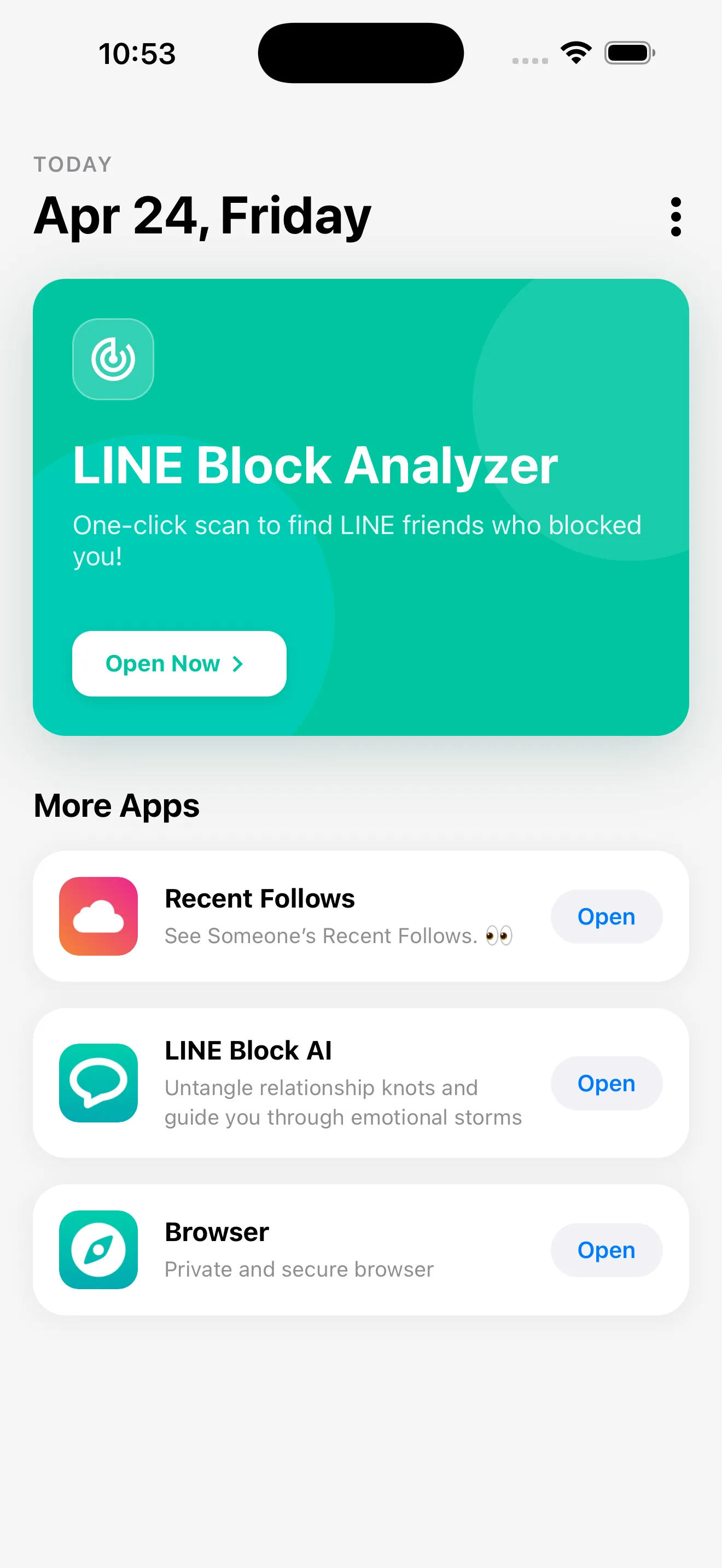
Step 2: Open the app, tap the "LINE Block Analyzer" card
You'll land on the IGExport app home screen. The green card at the top — "LINE Block Analyzer — find friends who blocked you on LINE with one tap" — is the entry point. Tap Start to begin.
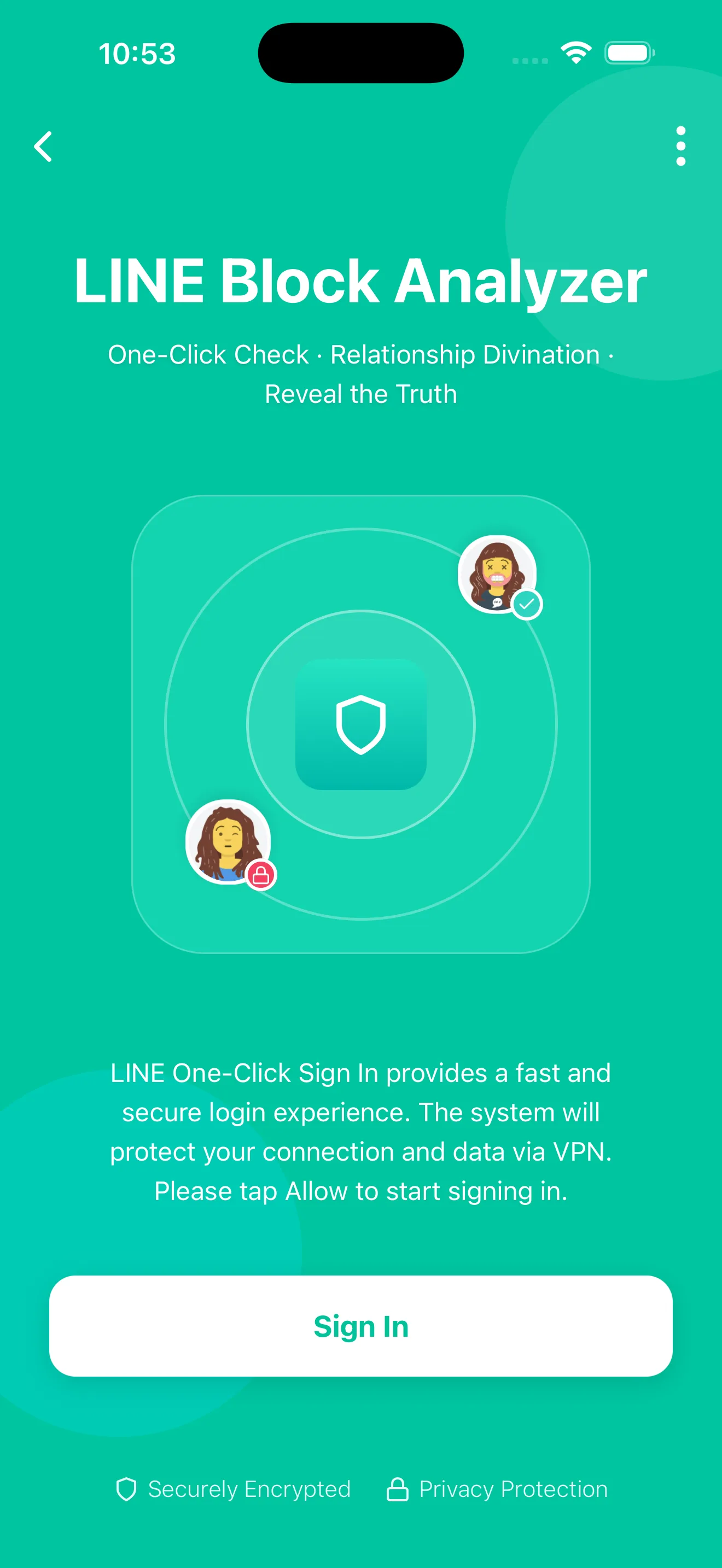
Step 3: Sign in with your LINE account
Block detection requires your own LINE identity to compare contact states — you can never look up whether some third person is blocked by someone else. Tap Sign in and complete LINE's verification with your account. The whole flow happens on your device — we don't store your password and never use your account to send messages to anyone. See the "Data security and privacy" section below for the full breakdown.
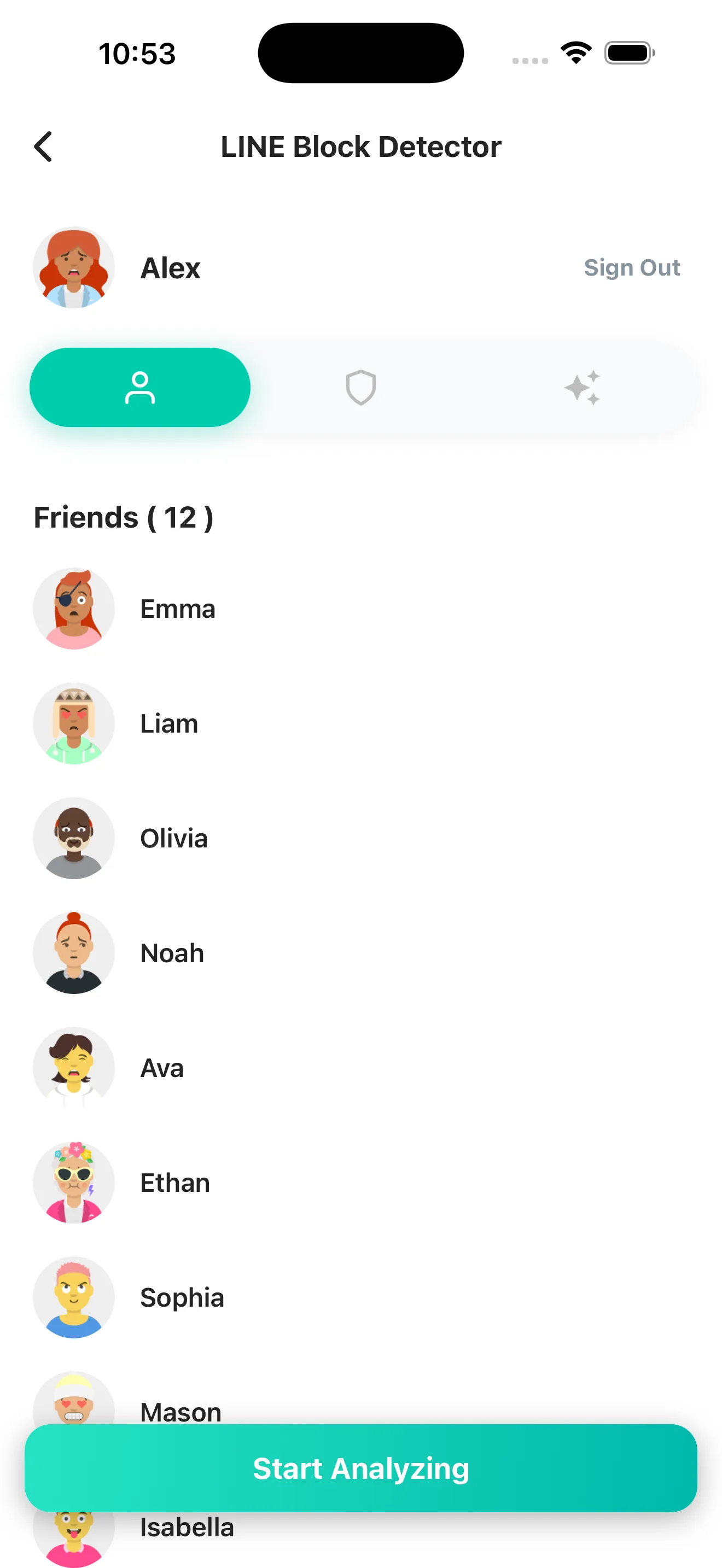
Step 4: See your friend list, tap "Start Analysis"
Once signed in, the app loads your full LINE friend list (the screenshot shows a 12-contact sample). Tap Start Analysis at the bottom and the app walks through each contact's state one by one.
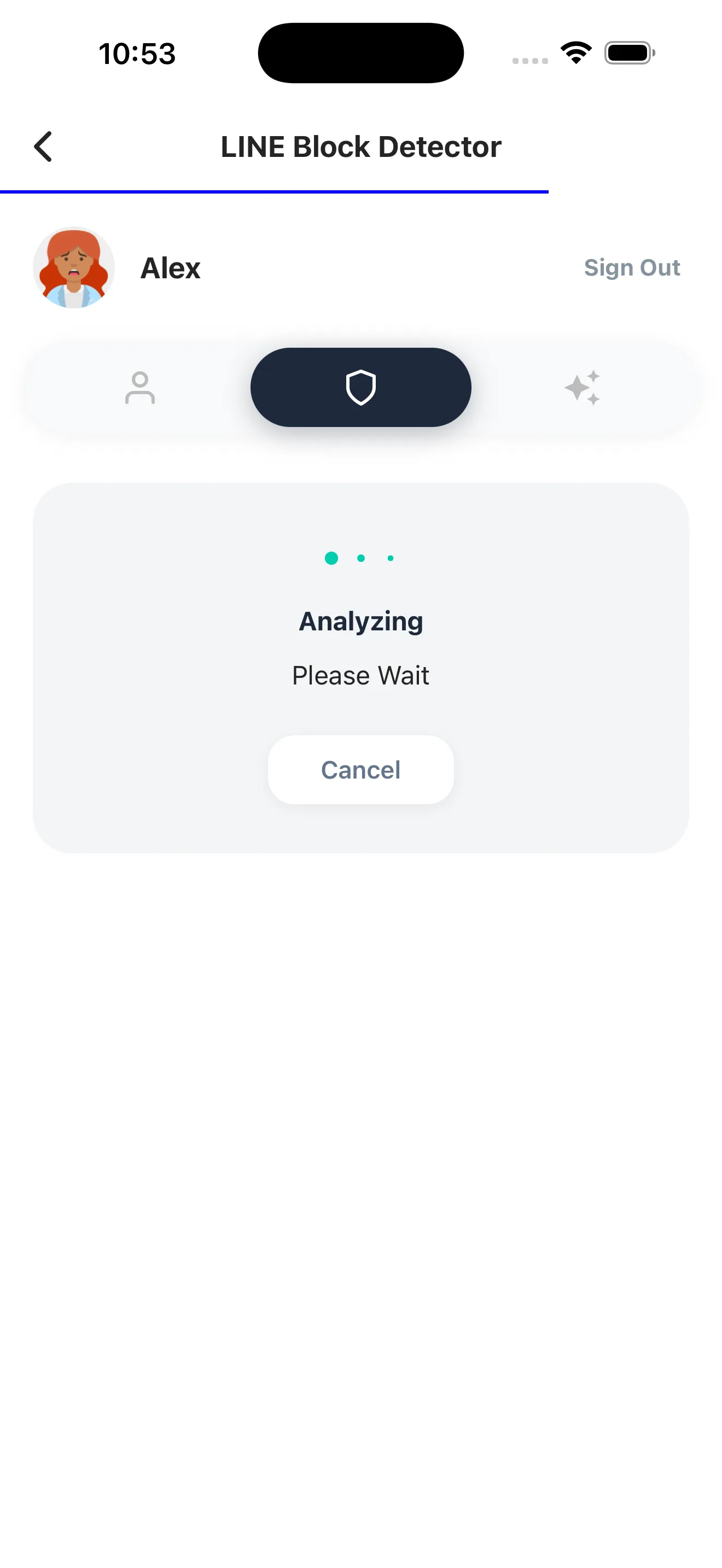
Step 5: Wait for the scan to finish
Scan time depends on how many friends you have — tens of contacts usually take under 10 seconds. You can leave the app in the background; it keeps processing.
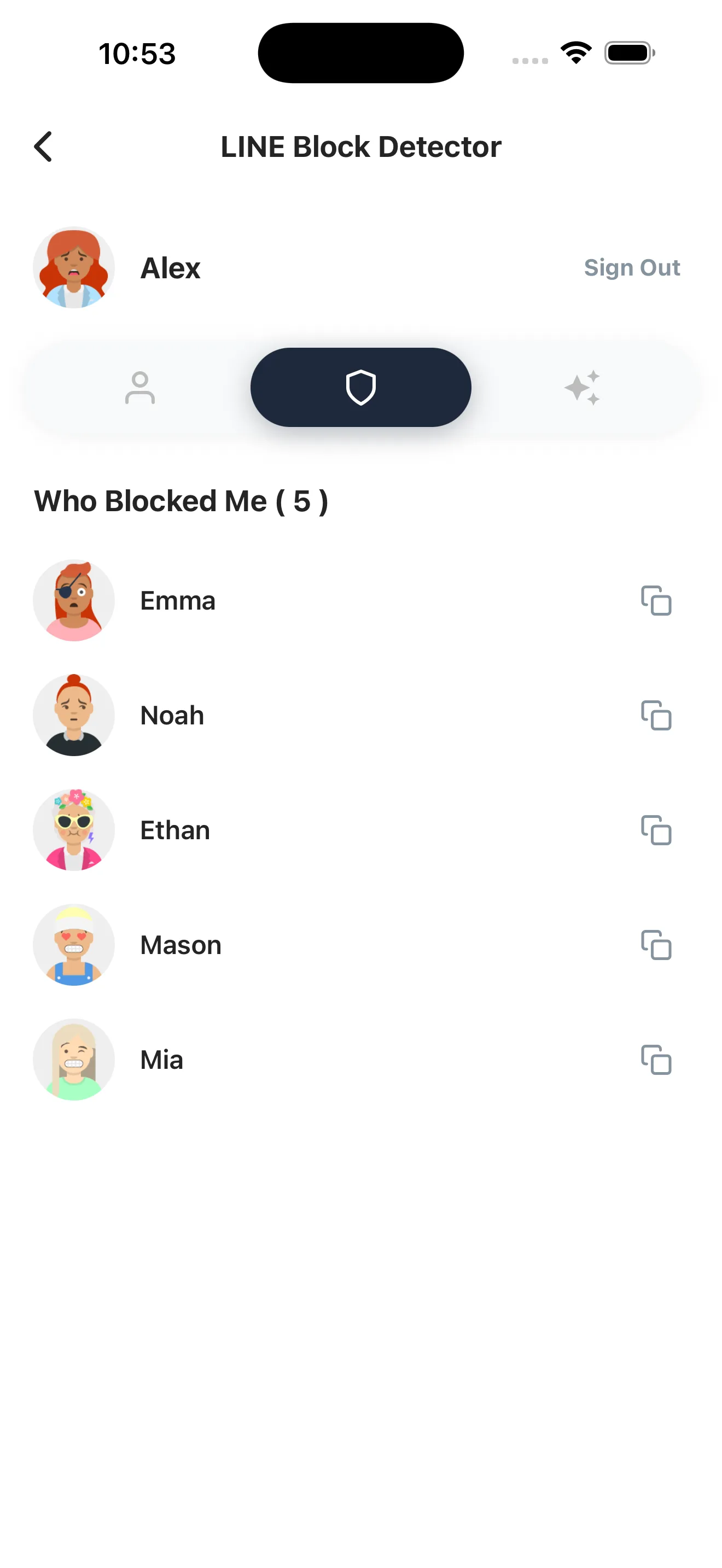
Step 6: See the "Blocked By" list
When the scan finishes, you jump straight to the results page: "Blocked By Me (5)" — the number is how many friends the app detected as having blocked you, followed by the full list. Each name has a copy button for reference.
DIY tricks vs LINE Block Checker: Why manual detection falls apart
Before apps like this existed, three DIY methods circulated online. They all work in theory — and fall apart in practice:
| Method | How it works | Why it breaks |
|---|---|---|
| Sticker test | Send a paid sticker the recipient doesn't own. "Already owned" error = not blocked. | One contact at a time. Testing 50 friends means buying stickers and waiting 50 times. |
| Fake group test | Create a group; if the contact's name can't be added, they blocked you. | If the contact is online, they receive a group invite notification. Awkward. |
| Voice call trick | On a blocked contact, their end never rings, but your side still shows "calling." | Can't distinguish "muted," "phone dead," or "bad signal." False positives everywhere. |
What LINE Block Checker does differently: one sign-in, one scan, the entire friend list checked simultaneously. Five seconds to see block status on 500 contacts. The other person receives zero messages, stickers, group invites, or call attempts.
Developer disclosure: why I built this
Disclosure: this app is developed and published by Total Management Services America Inc. This section is a first-hand account from someone with a stake in the product — treat it as such.
The project started from personal frustration — I wanted to know whether a specific person had blocked me on LINE, and the only options were the sticker test and the fake-group test. I gave up after the third awkward test. Paying for stickers, risking awkward group invites, getting inconclusive results — none of it felt like 2026.
After studying LINE's publicly documented behavior patterns, it turned out block status can be queried via the signed-in user's own identity — which is why every detection app on the market requires LINE login. So we built LINE Block Checker: one sign-in, one scan, the whole list checked at once.
In our internal testing, a 300-contact friend list scans in under 5 seconds. The same thing done manually takes an entire afternoon.
Data security and privacy: is your LINE account safe?
"Give a third-party app my LINE login" is a reasonable thing to be cautious about. Here's exactly how it's handled:
- Password never stored. Once verification completes, the password is cleared from memory immediately. Nothing is retained on our servers.
- Results live only on your device. The "Blocked By" list is computed and displayed locally. We don't upload it, sell it, or share it.
- The other person gets nothing. Detection sends no messages, stickers, group invites, or calls — zero footprint on the people being checked.
- Log out any time. The "Sign Out" button in the top right revokes access instantly.
Why does iOS show a VPN profile?
While LINE Block Checker is running, it activates a built-in VPN connection that handles network traffic for the detection requests. This VPN:
- Is only active while you're using the app — it stops the moment you fully close the app
- Doesn't proxy traffic from any other app — it serves only this app's own detection flow
- Doesn't log your browsing history
If you want to remove it manually, go to Settings → General → VPN & Device Management on iOS, or Settings → Connections → VPN on Android, and disable or delete it.
Frequently asked questions
What does LINE look like when someone blocks you? Do messages show an error?
No error. Your messages stay permanently "unread" — no red exclamation, no bounce notice. LINE is designed so the blocked person sees nothing different, which is why you can't tell from message behavior alone.
Can I still call someone who blocked me on LINE?
You can dial — your end will show "calling" — but their phone never rings and they never see a missed-call record. This is a common DIY detection trick, but "phone on silent," "bad reception," etc. produce the same behavior, so it's inconclusive.
Does the person I check get notified?
No. Detection via LINE Block Checker sends zero messages, stickers, calls, or group invites. The contacts you check have no way of knowing — that's the core difference between this app and the sticker-test method.
What's the difference between blocking and deleting a friend on LINE?
- Block: the contact stays in your friend list; their messages to you are filtered out and they can't see your stories.
- Delete: the contact disappears from your list — but they can still send messages to you (you just won't see them). LINE Block Checker primarily detects blocks, not deletions.
How do I unblock someone on LINE?
To unblock someone you blocked: Open LINE → Settings → Privacy → Blocked list → tap Unblock next to the name. If they blocked you, there's nothing you can do — only they can lift the block.
Is LINE Block Checker free? Do I need a subscription?
Core block detection is free. Optional premium features are available via subscription, but the main "who blocked me" scan doesn't require payment.
Is it available on iPhone and Android?
Both. The app is on the App Store and Google Play with identical flows.
Why do I have to sign in with LINE?
Because LINE block status is a relationship between two specific accounts — only your identity can query your state toward a given contact. Without signing in, there's no way — for any tool — to detect who blocked you.
Find out who blocked you on LINE
If you're unsure whether someone has blocked you, or you just want to know your real standing in a circle of friends, download LINE Block Checker and sign in once. No stickers, no fake groups, no tipoff to the other person — a complete list in 5 seconds.
Related reading
- How to Tell If Someone Blocked You on LINE: 6 Ways That Still Work in 2026 — pillar guide, every detection method with trade-offs and decision criteria
- Does the other person know when you block someone on LINE?
- What it looks like when you call someone who blocked you on LINE
- How to unblock on LINE — complete tutorial
- LINE block vs delete friend: what's the difference
About the app's developer
The LINE Block Checker app is developed and operated by Total Management Services America Inc. ("TMSA"), a California corporation. TMSA is the data controller and service provider responsible for the app. Editorial content is contributed by named authors; TMSA accepts publication responsibility for content covering LINE Block Checker. For legal, privacy, or support inquiries, contact info@tmsjob.com.
Legal: Privacy Policy · Terms of Use
Company profile: LinkedIn · App Store developer page · Crunchbase